AI Living Room Design — see your new living room in seconds
Roomvana's AI living room design tool turns a single photo of your living room into a realistic redesign in 23 styles. Upload your photo, choose a look, and see a new sofa, rug, media wall and layered lighting on your own room in about 30 seconds — while your layout, windows and fireplace stay exactly where they are. It's free to try online, and you can explore it without signing up.
No photo? Try an example: · ·
Space
Room
Mode
Upload a furnished room — the AI restyles it, keeping your layout.
Style
Free to try — 3 designs on your own room, no card needed.
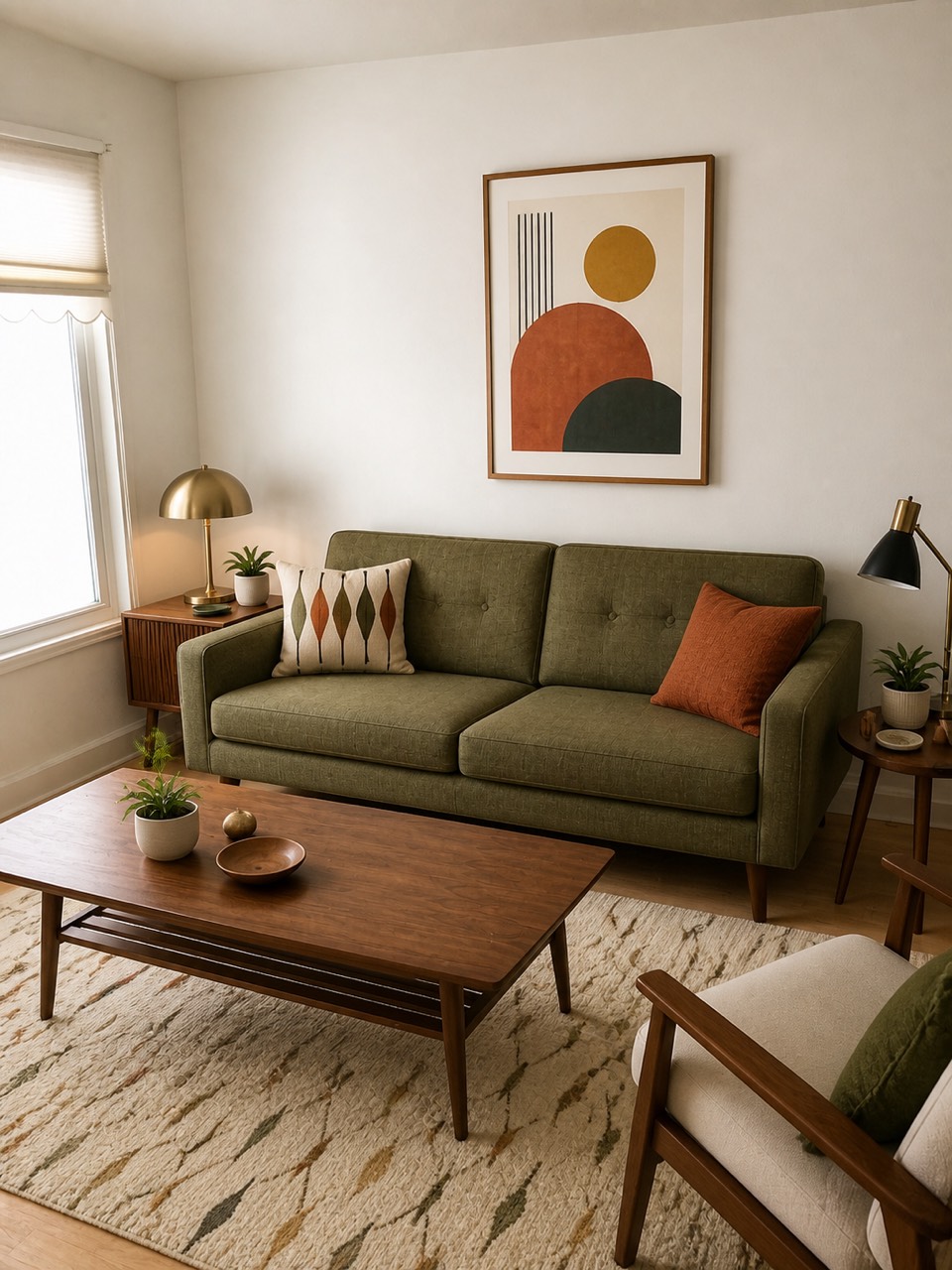 After
After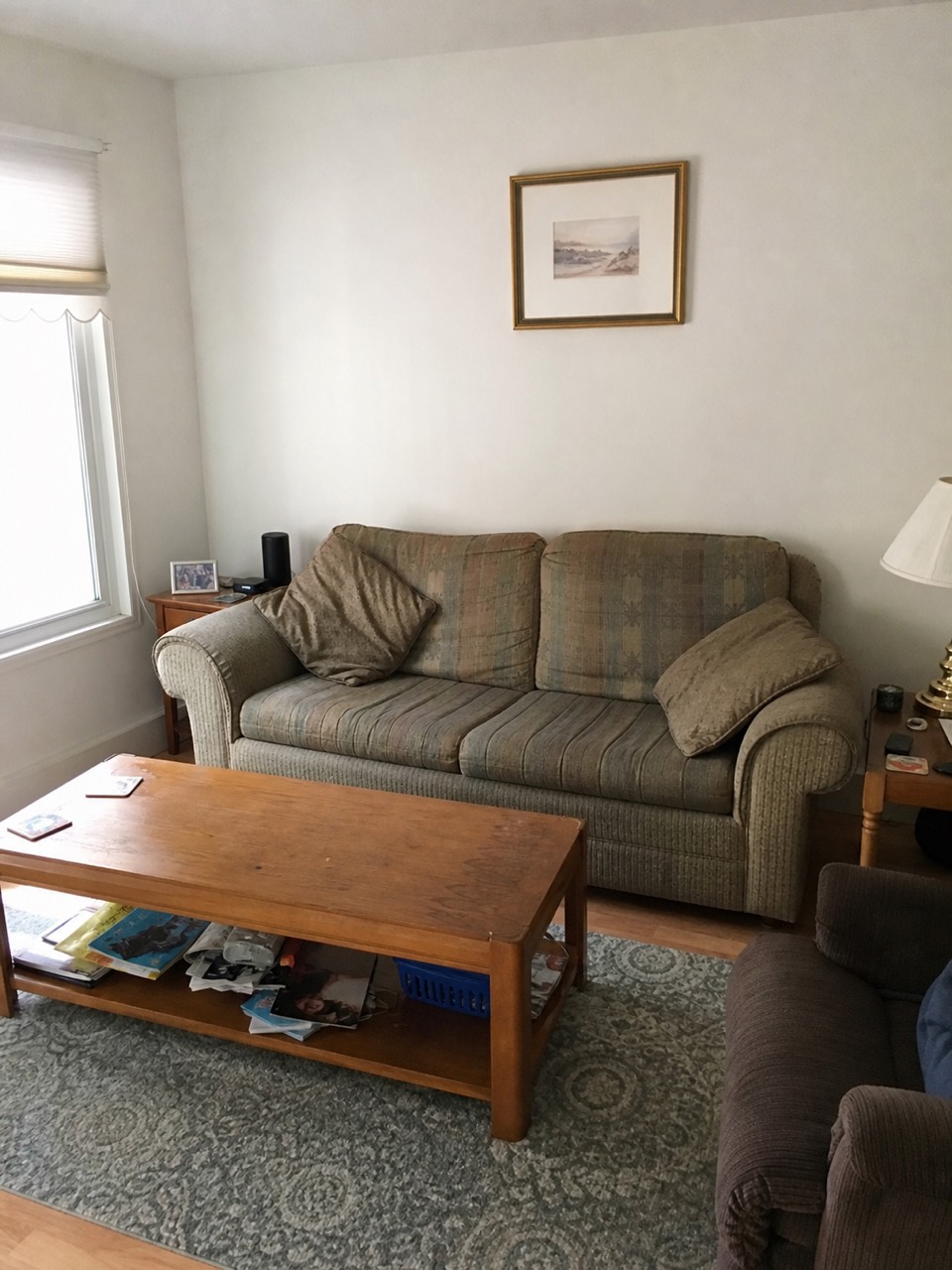 Before
Redesigned by Roomvana · Mid-Century Modern
Living room styles to try
How to redesign your living room with AI
- 1
Upload a photo of your living room
Take or upload a clear photo of your living room — a straight-on shot that shows the sofa wall or the fireplace and as much floor as possible works best.
- 2
Pick your style
Choose from 23 styles, from mid-century modern and Scandinavian to boho, Japandi and 2026 trends.
- 3
Generate in ~30 seconds
Roomvana renders a realistic redesign of your exact living room in about 30 seconds.
- 4
Compare, download, share
Slide between before and after, download your favorite, upscale it to 4K, or share a link with your partner or designer.
What the AI can change
It restyles
- · Sofa & sectional
- · Coffee & side tables
- · TV wall & media unit
- · Area rug & curtains
- · Accent chairs & gallery wall
- · Layered lighting, plants & paint
It never touches
- · The windows & fireplace location
- · Doorways & structural columns
- · The room's footprint
Frequently asked questions
What is AI living room design?+
AI living room design uses artificial intelligence to restyle a real photo of your living room. Instead of imagining a look from a catalog, you see your own room re-rendered in a new style — new sofa, rug, media wall and lighting — while the room itself stays recognizable. It's the fastest way to preview a makeover before spending on furniture.
How does the AI living room designer work?+
You upload a photo of your living room and pick a style. Roomvana's AI reads the room's shape, then restyles and refurnishes it while keeping your windows, fireplace and layout in place. In about 30 seconds you get a realistic before/after you can slide between, free and online.
How do I arrange furniture in a small living room?+
In a small living room, float the sofa a few inches off the wall, keep a single low coffee table, and use a rug large enough for the front legs of every seat to sit on — it visually ties the zone together and makes the space read bigger. Roomvana lets you test these moves on your own photo: because the AI keeps your walls and windows fixed, you can compare a slimmer sofa, a lighter palette or wall-mounted lighting side by side before you buy anything.
How do I lay out a living room with both a TV and a fireplace?+
The cleanest option is to stack them — mount the TV above the fireplace so both share one focal wall and your seating faces a single point. If the fireplace is off-center or the mantel sits too high, angle the seating toward the fireplace and place the TV on an adjacent wall or a swivel unit instead. Roomvana keeps your fireplace exactly where it is and restyles the media wall around it, so you can see both arrangements on your real room.
What is the 3-5-7 rule in decorating?+
The 3-5-7 rule is a decorating guideline that says objects grouped in odd numbers — threes, fives or sevens — look more natural and balanced than even-numbered groups. Odd groupings force your eye to move around the arrangement instead of splitting it into tidy pairs, which reads as more relaxed and collected. In a living room you'll see it in a coffee-table vignette of three items, five frames in a gallery wall, or seven mixed cushions across the sofa. Roomvana's styles layer decor with this kind of balance automatically.
How do I zone an open-plan living and dining room?+
Use an area rug to anchor the living zone and a second rug or a pendant light to define the dining zone, then let the back of the sofa act as a soft divider between the two. Keeping the palette shared but the furniture distinct signals two rooms without building a wall. Roomvana can restyle both zones in one look so you can preview how a rug, a console behind the sofa, or a change in lighting separates the areas — all without moving your actual walls or windows.
How can I make a long, narrow living room work?+
Break a long, narrow room into two zones instead of lining every piece against the walls — a seating group at one end and a reading nook, desk or console at the other stops the space feeling like a corridor. Floating the sofa and turning a chair across the room's width also interrupts the tunnel effect. Roomvana keeps your footprint fixed and restyles the furnishings, so you can test a two-zone layout on your own long room before rearranging anything.
Is Roomvana's AI living room design tool free?+
Yes. Every new account gets 3 free designs (watermarked) to try it on your living room — no credit card needed. After that, credit packs start at $5.99 for 10 designs and never expire; any purchase removes the watermark and unlocks 4K downloads, custom instructions and commercial use. There's no subscription.
Can I try it from a photo without signing up?+
You can explore the tool on our example living room photos without an account. To redesign your own photo you'll create a free account, which takes a few seconds and comes with 3 free welcome designs to try on your own photo.
What photo works best?+
A well-lit, straight-on photo that shows the sofa wall or fireplace and some floor gives the best results. Avoid heavy clutter, extreme angles and very dark shots. A normal phone photo taken from the doorway is usually perfect.
Which living room styles can I try?+
There are 23 styles, including mid-century modern, modern, Scandinavian, modern farmhouse, contemporary, industrial, boho, Japandi, traditional, coastal, modern luxury and a curated 2026-trends look. Try different styles and compare the results side by side.
Will the AI change my living room's layout, windows or fireplace?+
No. Roomvana is built to keep your layout, windows and fireplace location exactly where they are. It changes the furnishings and finishes — sofa, rug, media wall, lighting, flooring and wall color — so the result still looks like your living room, just restyled.
Can it show new furniture, not just paint?+
Yes. Unlike a paint-only preview, the AI re-renders the sofa, coffee table, media unit, rug and decor in your chosen style — so you can judge a whole furnishing direction on your own room, not just a wall color.
Can I download a higher-resolution version?+
Every design comes at a standard resolution that's great for comparing styles and sharing the idea. When you want a crisp, print-ready copy, upscale any design to 4K for just 1 credit.
What happens to my photos?+
Your photos stay private and are never used to train AI models. They're stored only so you can revisit your designs, and you can delete them any time from your gallery or by deleting your account.