AI Exterior Design — redesign your home's exterior from a photo
Roomvana's AI exterior design tool turns a single photo of your house into a realistic restyled facade in 23 styles. Upload a front-on photo, pick a look, and in about 30 seconds you'll see new siding, paint, roofing, a fresh front door and improved curb appeal — while your rooflines, windows and the shape of the house stay exactly where they are. It's the fastest way to preview an exterior makeover before you repaint or renovate. It's free to try, with no sign-up needed to explore.
No photo? Try an example: · ·
Space
Mode
Upload a photo of your home's exterior — the AI restyles the facade, materials and front yard while keeping the structure.
Style
Free to try — 3 designs on your own room, no card needed.
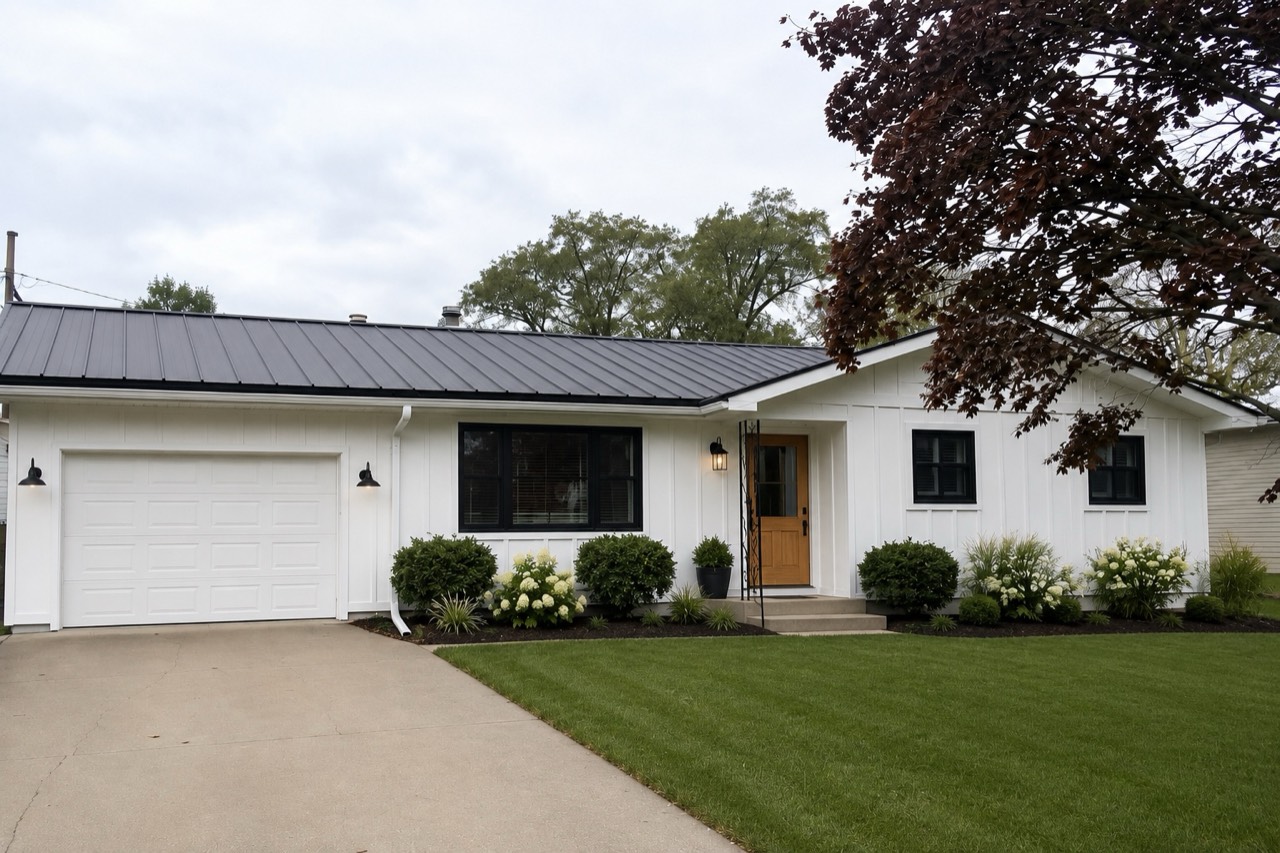 After
After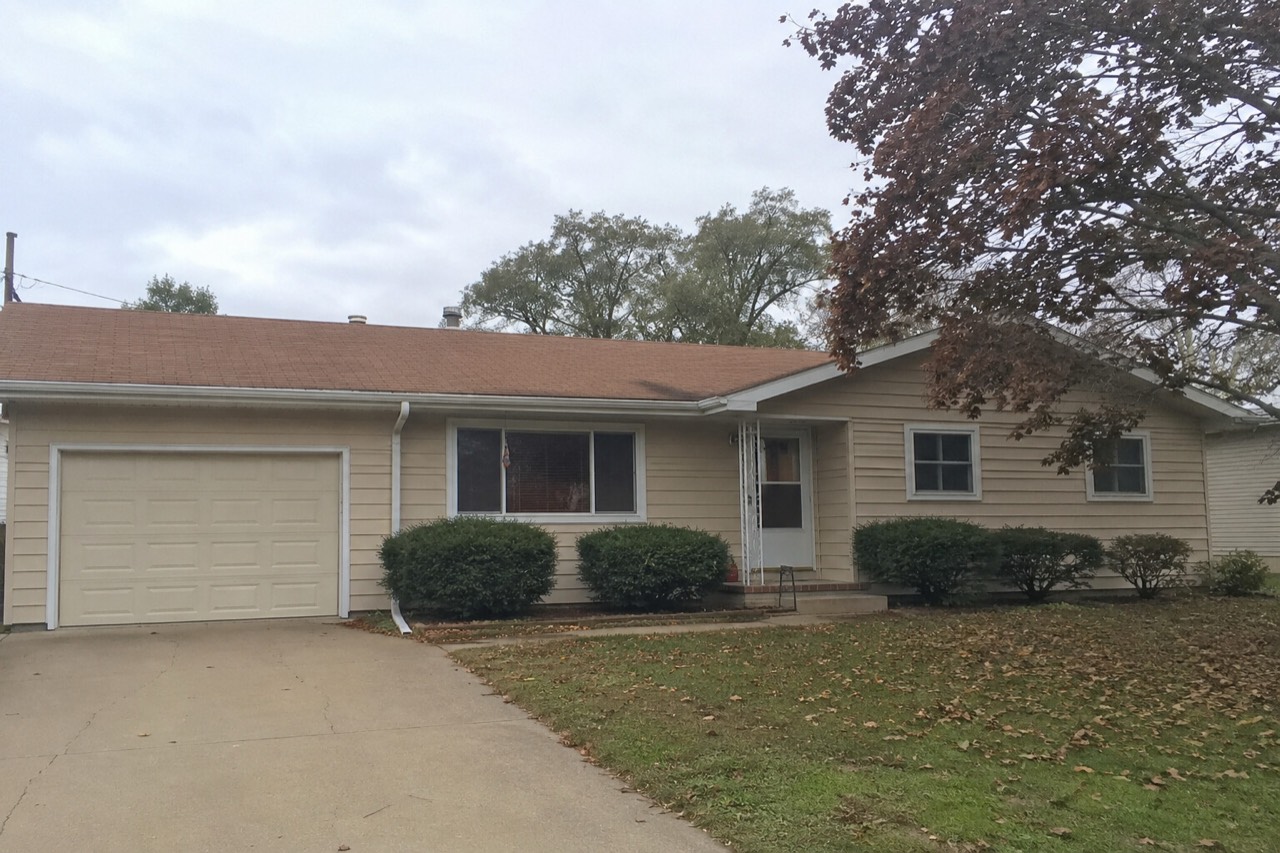 Before
Real result — the same house, restyled in modern farmhouse
Exterior styles to try
How to redesign your house exterior with AI
- 1
Upload a photo of your house exterior
Take or upload a clear, front-on photo of your house in good daylight — one that shows the full facade, front door, roofline and a bit of the yard works best.
- 2
Pick your style
Choose from 23 exterior styles, from modern farmhouse and Mediterranean to coastal, French country and modern luxury — and imagine your home's new siding, paint and curb appeal.
- 3
Generate in ~30 seconds
Roomvana renders a realistic, restyled version of your exact house in about 30 seconds, keeping the structure and rooflines in place.
- 4
Compare, download, share
Slide between before and after, download your favorite, upscale it to 4K, or share a link with your partner, painter or contractor.
What the AI can change
It restyles
- · Facade materials & cladding
- · Siding & paint colors
- · Front door & garage door
- · Window trim & shutters
- · Roofing color & material
- · Porch, columns & railings
- · Driveway & walkway finishes
- · Outdoor & entry lighting
- · Front-yard landscaping
It never touches
- · The rooflines & overall shape of the house
- · The number and position of windows & doors
- · The number of storeys
- · The building's footprint & structure
- · The camera angle of your photo
Frequently asked questions
What is AI exterior design?+
AI exterior design uses artificial intelligence to restyle a real photo of your house's exterior. Instead of imagining a look from a brochure, you see your own home re-rendered with new siding, paint, roofing, a fresh front door and better curb appeal — while the house itself stays recognizable. It's the fastest way to preview an exterior makeover before you commit to a repaint or renovation.
How does the AI exterior designer work?+
You upload a front-on photo of your house and pick a style. Roomvana's AI reads the facade — its rooflines, windows and shape — then restyles the materials, colors and finishes while keeping the structure in place. In about 30 seconds you get a realistic before/after you can slide between.
Is Roomvana's AI exterior design tool free?+
Yes. Every new account gets 3 free designs (watermarked) to try it on your house — no credit card needed. After that, credit packs start at $5.99 for 10 designs and never expire; any purchase removes the watermark and unlocks 4K downloads, custom instructions and commercial use. There's no subscription.
Can I try it from a photo without signing up?+
You can explore the tool online on our example house photos without an account. To redesign your own photo you'll create a free account, which takes a few seconds and comes with 3 free welcome designs to try on your own house.
Will the AI keep my house's structure and rooflines?+
Yes. Roomvana is built to keep your rooflines, the number and position of your windows and doors, your number of storeys and the overall footprint of the house exactly where they are. It changes the surface materials and finishes — siding, paint, roofing, trim, door and landscaping — so the result still looks like your home, just restyled.
Can it change my siding, paint color or roof color?+
Absolutely — those are the most popular changes. You can preview new siding or cladding, a completely different paint color, and a new roof color or material, all on your actual house. Trying a few combinations side by side is a quick way to see which palette suits your home before you buy a single gallon of paint.
Does it work for the front of the house and curb appeal?+
Yes — the front facade is exactly what it's built for. A front-on photo lets the AI restyle everything a passerby sees: the door, porch, siding, trim, lighting and front-yard landscaping. It's a practical way to judge curb-appeal ideas before a sale, a repaint or a weekend project.
Can I try styles before I repaint or re-side?+
That's one of the best uses. Instead of guessing from tiny swatches, you see a full-color preview on your own house in seconds, so you can compare a modern farmhouse look against a coastal or Mediterranean one before committing. It won't replace a painter's color match, but it makes the decision far less of a gamble.
What kind of photo works best?+
A straight, front-on shot taken in good daylight works best — ideally with the whole facade in frame, minimal glare and few cars, people or heavy shadows in the way. Overcast light or soft morning/evening light is very forgiving. The clearer the house reads in your photo, the more realistic and useful the restyled result.
Is the result realistic?+
The renders aim to look like a real photo of your house with new finishes, using believable materials like fiber-cement siding, brick, stucco, stone and standard roofing. It's a visual preview rather than an engineering drawing, so treat colors and textures as inspiration and confirm exact products and measurements with a contractor before you build.
Does it do landscaping too?+
Yes. Alongside the facade, the AI can refresh front-yard landscaping — plantings, a tidier lawn, walkway and driveway finishes and entry lighting — so you see the whole curb-appeal picture, not just the walls. If you'd rather focus only on the building, you can add a custom instruction to keep the yard as-is.
Can I use it to plan a real repaint or renovation?+
It's a great planning and communication tool. Many homeowners use the before/after to align with a partner, then share the render with a painter, contractor or designer as a visual brief. Just remember it doesn't produce permits, structural plans or exact material specs — it shows the look you're going for so the real work starts from a clear picture.
Can I use the designs for real estate or commercial work?+
Yes — any credit purchase unlocks commercial use, so agents and pros can use exterior renders in listings, curb-appeal proposals and client presentations. When you show a restyled facade to a buyer or client, it's good practice to label it as an AI visualization rather than the home's current condition.