AI Backyard Design — redesign your backyard from a photo
Roomvana's AI backyard design tool turns a single photo of your yard into a realistic outdoor design in 23 styles. Upload your photo, choose a look, and see your backyard redesigned — new lawn, patio, fire pit, pergola and outdoor furniture — in about 30 seconds, while your house and fence lines stay exactly where they are. It works for big yards and small city plots alike. It's free to try, and you can explore it online without signing up.
No photo? Try an example: · ·
Space
Outdoor space
Upload a photo of your outdoor space — the AI restyles the planting, paving and features while keeping your home and boundaries.
Style
Free to try — 3 designs on your own room, no card needed.
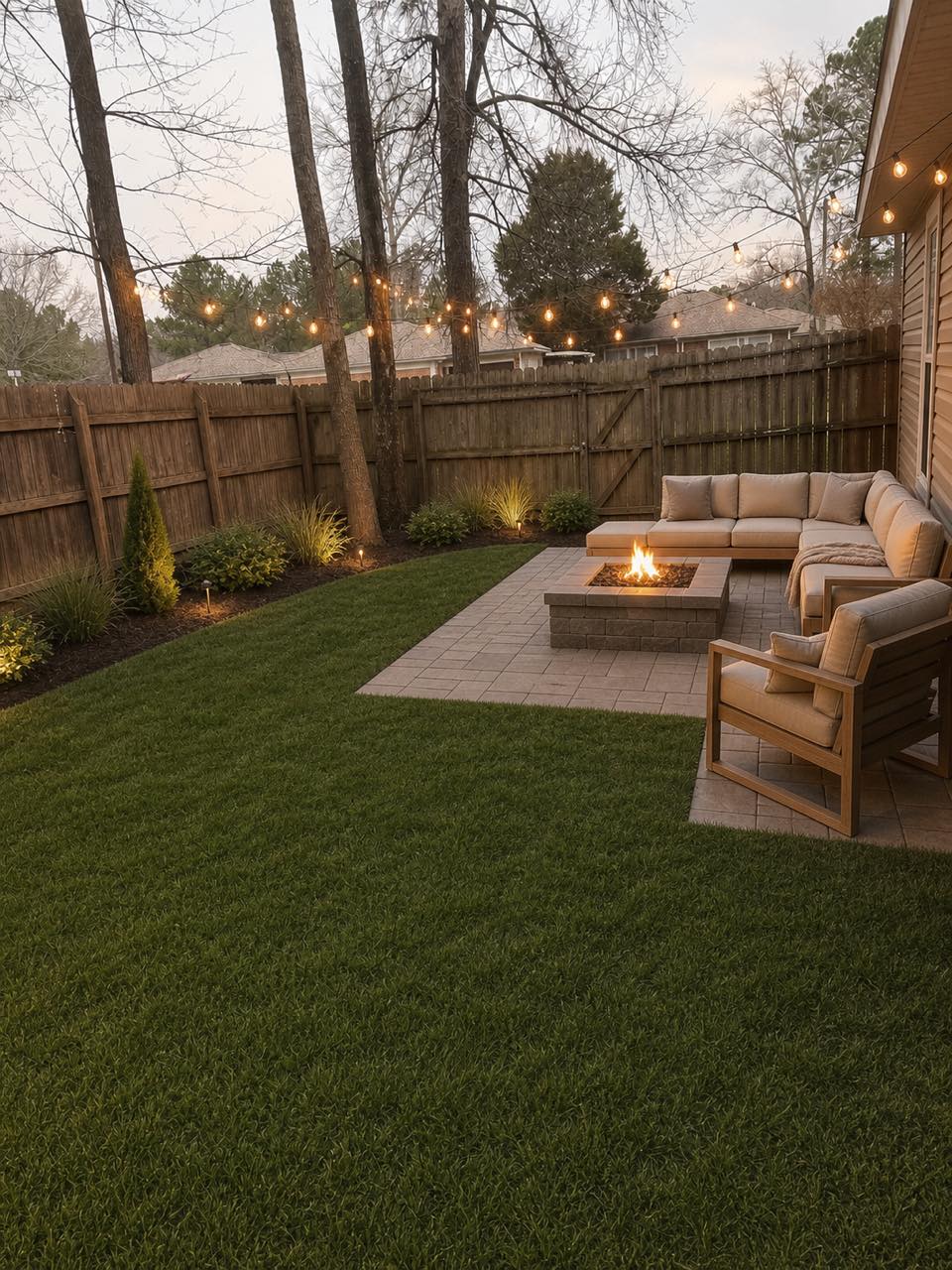 After
After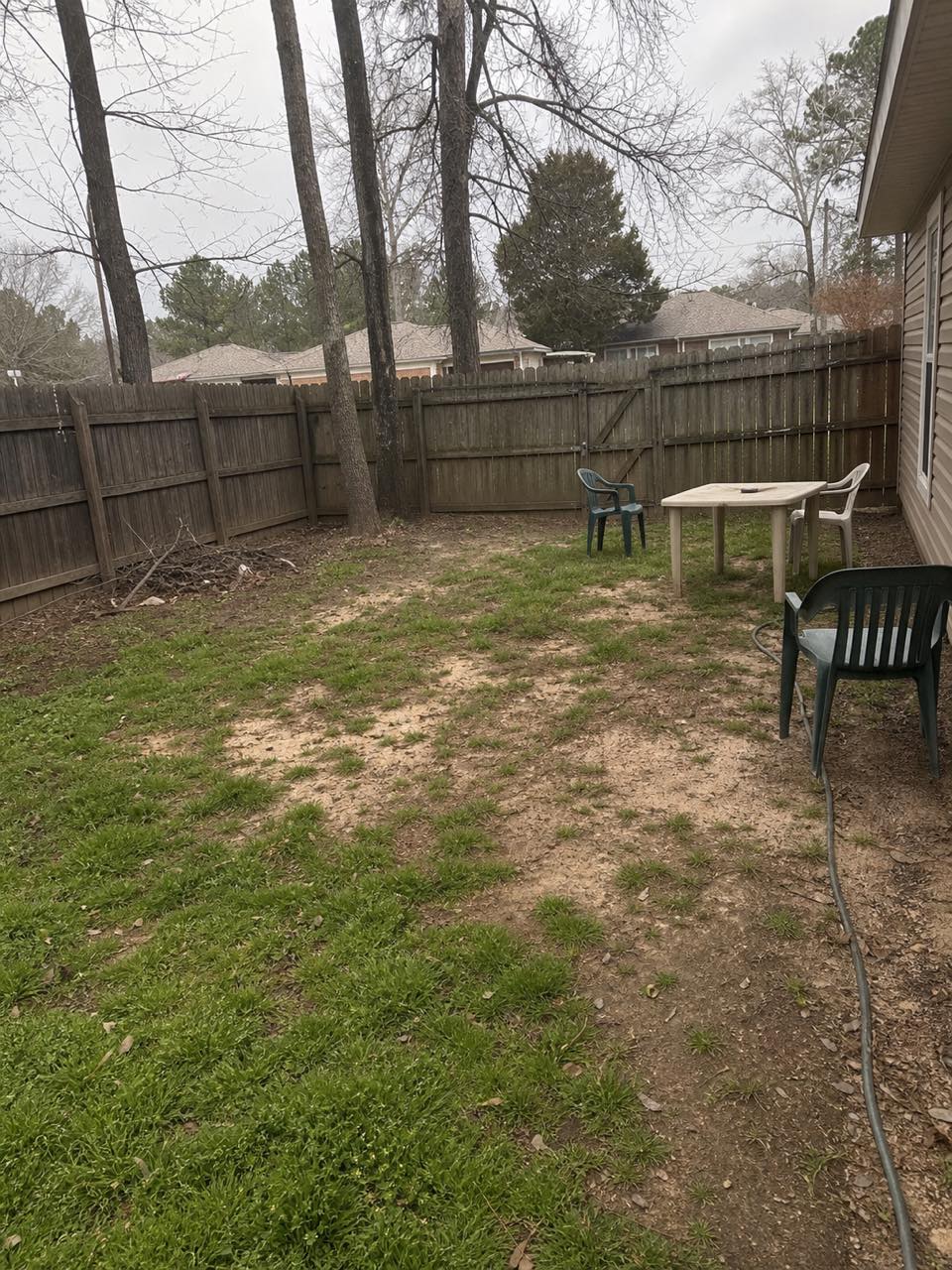 Before
Real result — the same backyard, redesigned in a modern outdoor-living style
Backyard styles to try
How to redesign your backyard with AI
- 1
Upload a photo of your backyard
Take or upload a clear photo of your backyard — a straight-on shot in daylight that shows the lawn, patio and a bit of the house works best, whether it's a large yard or a small city plot.
- 2
Pick your style
Choose from 23 styles, from modern and contemporary to Mediterranean, tropical, coastal and rustic — and picture the space with a new lawn, patio, fire pit, pergola and outdoor furniture.
- 3
Generate in ~30 seconds
Roomvana renders a realistic, redesigned version of your exact backyard in about 30 seconds, keeping your house and fence lines in place.
- 4
Compare, download, share
Slide between before and after, download your favorite, upscale it to 4K, or share a link with your partner, landscaper or contractor.
What the AI can change
It restyles
- · Lawn, ground cover & planting
- · Patio, decking & paving
- · A fire pit or outdoor fireplace
- · A pergola, gazebo or shade structure
- · Outdoor furniture & an entertaining area
- · An outdoor kitchen or BBQ zone
- · Trees, shrubs, beds & borders
- · Garden lighting & path lights
- · Planters, screens & raised beds
It never touches
- · The house walls & structure
- · Your property lines & where boundary fences sit
- · The permanent hardscape footprint
- · Neighboring buildings & rooflines
- · The camera angle of your photo
Frequently asked questions
What is AI backyard design?+
AI backyard design uses artificial intelligence to redesign a real photo of your backyard. Instead of picturing ideas from a magazine, you see your own yard re-rendered with a new lawn, patio, planting and outdoor furniture — while the space stays recognizable. It's the fastest way to preview a backyard makeover before you hire a landscaper or buy anything.
How does the AI backyard design tool work?+
You upload a photo of your backyard and pick a style. Roomvana's AI reads the layout, then redesigns the yard — lawn, paving, planting, a fire pit or pergola — while keeping your house and fence lines in place. In about 30 seconds you get a realistic before/after you can slide between.
Is Roomvana's AI backyard design tool free?+
Yes. Every new account gets 3 free designs (watermarked) to try on your own backyard — no credit card needed. After that, credit packs start at $5.99 and never expire; any purchase removes the watermark and unlocks 4K downloads, custom instructions and commercial use. There's no subscription.
Can it design a small or city backyard?+
Yes. Compact yards, city gardens and narrow lots work well — try a minimalist, japandi or contemporary style and the AI can show a small patio, screening, container planting and clever lighting that make a tight space feel intentional. Upload a photo of the space and try a few looks side by side to see what fits.
Can I design a dog- and kid-friendly backyard?+
You can steer it that way. Once you've made a purchase you can add custom instructions asking for a hard-wearing lawn, an open play area, a paved patio and soft, rounded planting instead of thorny beds, and leave out a pool or pond if you'd rather avoid open water. The renders are concept images, so use them to agree a family-friendly layout, then confirm safe surfaces and secure fencing with a professional.
Can it add a pool, fire pit or hot tub?+
Yes — a fire pit, pergola, outdoor kitchen, even a pool can appear in the generated design when they suit the style you choose. Keep in mind these are concept images for inspiration, not construction or engineering drawings. Treat a rendered pool or fire feature as a look to explore and price with a contractor, not a buildable plan.
How should I photograph my backyard?+
A clear daytime photo taken straight on, showing the lawn or patio and a bit of the house or fence, gives the AI the most to work with. Avoid heavy shadows, rain or a shot that's mostly sky. If the first render isn't quite right, retake it from a slightly higher angle and try again.
How do I plan a backyard layout without hiring a landscaper first?+
It's a low-cost way to test directions before you spend. Compare a simple DIY-friendly gravel-and-planting scheme against a fuller patio-and-pergola build on your own photo, so you can see what each ambition looks like before you price materials or brief a landscaper. Ruling out the layouts you don't love is often worth as much as finding the one you do.
Does it work as a backyard landscape design tool, or just for patios and outdoor furniture?+
Both. A single design can update the lawn, garden beds, borders, trees, patio, pergola and seating together. If you want to focus on planting and the yard as a whole, use the landscape design page. If patios and outdoor living are your priority, stay here.
Can I get a free backyard design without booking a consultation?+
Yes. New accounts get exactly 3 free, watermarked designs. Upload a photo of your yard and start — there's no consultation to book and no phone number required. If you meet with a landscaper later, you can use the previews to show them the direction you have in mind.
Is there an app to download, or does it run in the browser?+
It runs in your browser on a phone, tablet or laptop, so there's nothing to install. Take a photo of your yard, upload it, and compare a few styles right away.
Can it help when I'm selling my house?+
Yes. If you're selling, a redesigned backyard photo helps buyers picture the outdoor potential of the space, and gives you a visual to discuss with a landscaper or stager. Any credit purchase unlocks commercial use, so agents and stagers can use the renders in listings and proposals.
How is this different from the patio and landscape pages?+
They overlap, and you can use whichever fits. This page redesigns the whole backyard — lawn, patio, planting and features together. The patio tool zooms in on a paved seating or dining area, while the landscape tool leans toward planting, grading and the wider plot. If you're reworking the entire yard, start here and jump to the others to focus on one part.
Can it show an outdoor living or entertaining area?+
Yes. Ask for an entertaining area and the AI can render an outdoor living zone — a pergola or shade structure, lounge and dining furniture, a fire pit and lighting arranged on your own patio or lawn. Try a modern or Mediterranean style to see how the space would feel set up for hosting.
Is the result realistic?+
The renders aim for a realistic, photographic look rather than a flat plan, so you get a genuine feel for how a style would sit in your yard. It's a visual preview, not a surveyed design — treat it as inspiration and a brief, and confirm exact dimensions, drainage and levels with a professional before building.
How long does it take, and how many designs do I get?+
Each design takes about 30 seconds from a single photo. New accounts get 3 free welcome designs to try, and credit packs — which never expire — let you generate as many looks as you like. That's handy when you want to compare several styles on the same backyard.
Can I try it without signing up, and are my photos private?+
You can explore the tool online on our example backyard photos without an account, so you can judge the quality first. To redesign your own photo you'll create a free account, which takes a few seconds and includes 3 free welcome designs. Your uploads stay private to your account — they aren't shown publicly or used to promote the tool.