AI Landscape Design — transform your yard from one photo
Roomvana's AI landscape design tool turns one photo of your yard into a realistic redesign in 23 styles. Upload a picture of your front yard or backyard, pick a look, and see it reimagined — new planting, lawn, walkways, a patio and lighting — in about 30 seconds, while your house, fences and property lines stay exactly where they are. It works for wide suburban lots, sloped yards and small courtyards alike. It's free to try, and you can explore it online before you sign up.
No photo? Try an example: · ·
Space
Outdoor space
Upload a photo of your outdoor space — the AI restyles the planting, paving and features while keeping your home and boundaries.
Style
Free to try — 3 designs on your own room, no card needed.
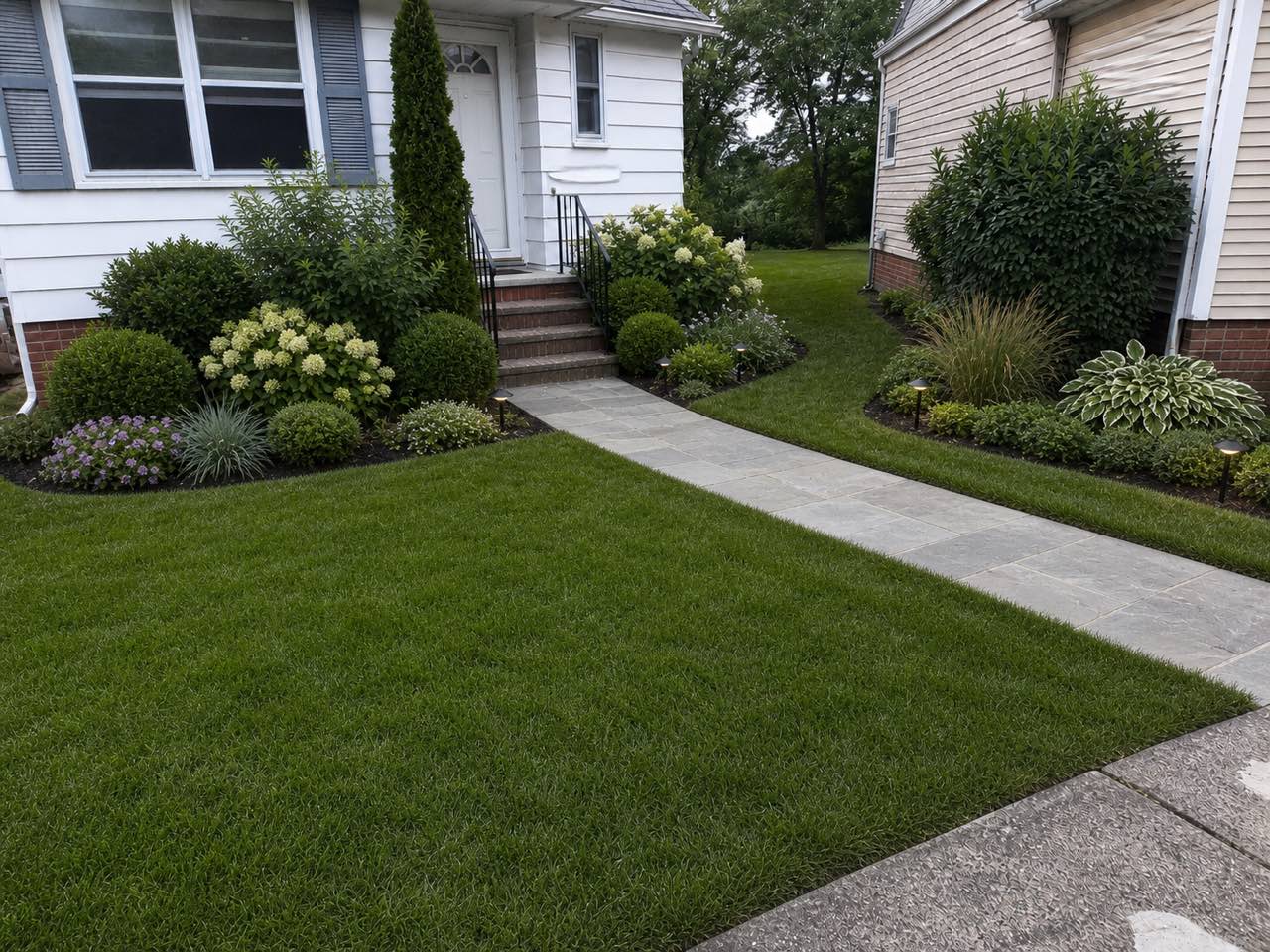 After
After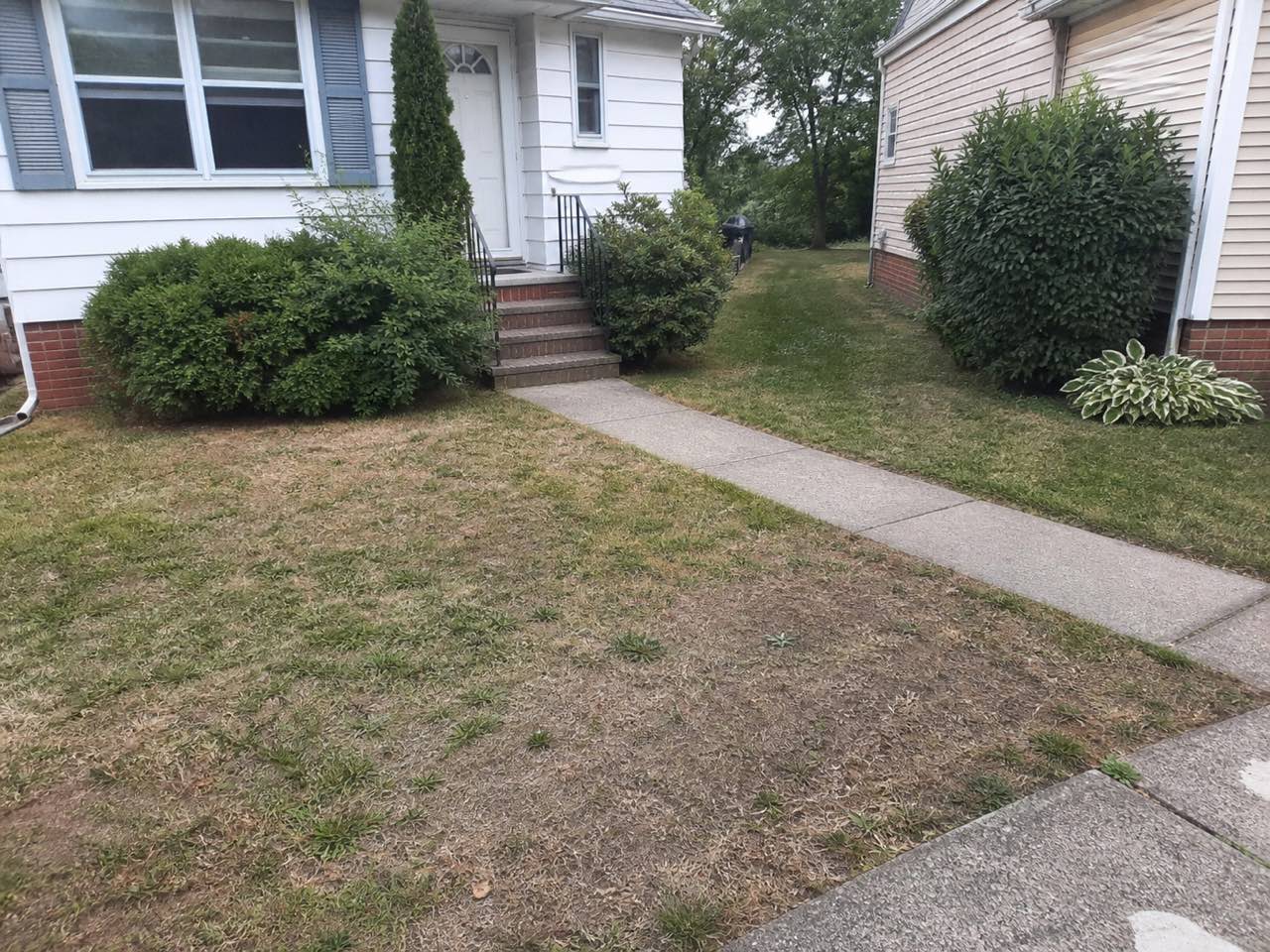 Before
Real result — the same yard, redesigned in a modern landscape style
Landscape styles to try
How to redesign your landscape with AI
- 1
Upload a photo of your yard
Take or upload a clear photo of the space you want to change — a straight-on daylight shot that shows the lawn, beds and a bit of the house works best, whether it's a front yard, backyard or side strip.
- 2
Pick a landscape style
Choose from 23 styles, from modern and Mediterranean to tropical, coastal, cottage and French country — and picture the yard with new planting, walkways, a patio and lighting.
- 3
Generate in ~30 seconds
Roomvana renders a realistic, replanted version of your exact yard in about 30 seconds, keeping your house, fences and property lines in place.
- 4
Compare, download, iterate
Slide between before and after, download your favorite, upscale it to 4K, or try another style or two before you share the result with your family or a landscaper.
What the AI can change
It restyles
- · Planting, flower beds & borders
- · Lawn, ground cover & meadow
- · Trees, shrubs & hedging
- · Paths, walkways & stepping stones
- · A patio, deck or seating area
- · Hardscape — gravel, paving & retaining walls
- · Outdoor lighting & up-lights
- · Outdoor furniture & a fire pit
- · Water features, ponds & fountains
It never touches
- · The house walls & structure
- · Your property lines & boundaries
- · Fence positions & lot lines
- · Neighboring homes & rooflines
- · The camera angle of your photo
Frequently asked questions
What is AI landscape design?+
AI landscape design uses artificial intelligence to redesign a real photo of your yard. Instead of guessing from a catalog or a flat plan, you see your own front yard or backyard re-rendered with new planting, paths, a patio and lighting — while the space stays recognizable. It's the fastest way to preview a landscape before you hire anyone or buy a single plant.
How does the AI landscape designer work?+
You upload a photo of your yard and pick a style. The landscaping AI reads the layout — where the lawn, beds, driveway and house are — then replants and reworks the space while keeping your house, fences and boundaries in place. In about 30 seconds you get a realistic before/after you can slide between.
Does it work for both front yards and backyards?+
Both. Use it on a front yard for curb appeal — a tidy path, foundation planting and a welcoming entrance — or on a backyard to plan a patio, lawn and borders. Just upload a clear photo of whichever space you're working on and try a few styles to compare.
Can I change only the planting and keep my driveway or existing hardscape?+
To a degree, yes. If you like your driveway or paving, shoot the photo so the AI can see it in context, then favor styles that build around what you already have rather than a full rebuild. It renders the whole scene at once, so treat it as a look-and-feel preview — you decide with your landscaper which existing features actually stay.
Is Roomvana's AI landscape design tool free?+
Yes. Every new account gets 3 free designs (watermarked) to try it on your own yard — no credit card needed. After that, credit packs start at $5.99 and never expire; any purchase removes the watermark and unlocks 4K downloads and commercial use. There's no subscription.
Can I try it without signing up?+
You can explore the tool online on our example yard photos without an account, so you can see how it works first. To redesign your own photo you'll create a free account, which takes a few seconds and comes with 3 free welcome designs to spend on your yard.
Will it keep my house, boundaries and fences?+
Yes. Roomvana is built to keep your house walls, fence positions and property lines exactly where they are. It changes what's inside the yard — planting, lawn, paths, a patio and lighting — so the result still looks like your place, just redesigned, and won't imply you can build past your actual lot line.
Is this useful before I hire a landscaper?+
That's one of the best times to use it. Generate a couple of directions you like, then share the link so a landscaper or gardener can see exactly what you're picturing on your own yard. It turns a vague 'I want the front to look less tired' into a concrete visual brief, which usually leads to faster, more accurate quotes.
How does this compare with online landscape design services?+
Online landscape design services connect you with a human designer who may provide a planting plan and a shopping list. They typically take one to three weeks and cost a few hundred dollars. Roomvana gives you a visual preview of your own yard in about 30 seconds, with no consultation or design brief required. It is not a scale plan, survey, planting plan or construction drawing, but you can use the preview as a reference if you hire a designer later.
How is this different from landscape design software with a 3D planner?+
Traditional landscape design software usually requires you to measure your property and build a 3D model by placing elements such as trees, patios and paths. Roomvana starts with one photo of your real yard and creates a redesigned visual preview from that view. The result is not a scale plan, survey or construction drawing, so you'll still need measured plans before starting construction.
Do I need to download a landscape design app?+
No. Roomvana runs in your browser on a phone, tablet or laptop, so there's nothing to install. Upload a photo of your yard from your device to get a redesigned visual preview.
How many styles can I get?+
All 23 styles are available for a yard. This page highlights modern, Mediterranean, tropical, coastal, cottage and French country. Each design uses one credit, and comparing two or three side by side is the quickest way to find a direction you actually want to build.
How should I take the photo for the best result?+
A clear daytime photo taken straight on, showing the lawn or beds plus a bit of the house or boundary, gives the AI the most to work with. Avoid heavy shadows, rain or a shot that's mostly sky. If the first render isn't quite right, retake it from a slightly higher angle and try again.
Do designs have a watermark, and can I use them commercially?+
Free designs carry a small watermark and are for personal exploration. Any credit purchase removes the watermark and unlocks commercial use, so landscapers, gardeners and real-estate agents can put the renders in client proposals and listings.
Are my photos private?+
Yes. Your uploads stay private to your account and aren't used to train the model. They're processed to generate your design and shown back to you — not published or shared unless you choose to share a result yourself.
How is this different from the AI garden design page?+
They share the same engine and overlap a lot. The garden page leans toward planting-led beds, borders and softer schemes; this landscape page frames the whole yard — front and back, lawn, hardscape, paths and curb appeal. If you're focused on plants, start on the garden page; if you're reworking the overall look of your property, start here.
Can it handle a sloped yard or a dry-climate xeriscape?+
It can show the look of both. For a slope, shoot the photo so the grade is visible and the AI will render terracing or planting that suits it; for a dry region, pick a Mediterranean or modern style to preview a gravel, succulent and drought-tolerant xeriscape. It's a visual guide, not a drainage or grading plan, so confirm levels and water with a pro before building.
Can I use it for HOA approval or curb appeal before selling?+
Both are common uses. For a listing, a quick front-yard refresh shows buyers the curb-appeal potential of the lot; for an HOA, a realistic render helps you present a proposed change to the board. Just note it's a design preview, not a survey or a construction drawing, so pair it with real plans where approval requires them.