AI Patio Design Tool — redesign your patio from a photo
Roomvana's AI patio design tool turns a single photo of your patio into a realistic outdoor living space in about 30 seconds. Upload your photo, pick a style, and see your patio reimagined — new pavers, a pergola or shade sail, comfortable furniture, planters and lighting — while your house, walls and property lines stay exactly where they are. It works for tiny townhouse patios and sprawling covered patios alike. It's free to try, and you can explore it online before signing up.
No photo? Try an example: · ·
Space
Outdoor space
Upload a photo of your outdoor space — the AI restyles the planting, paving and features while keeping your home and boundaries.
Style
Free to try — 3 designs on your own room, no card needed.
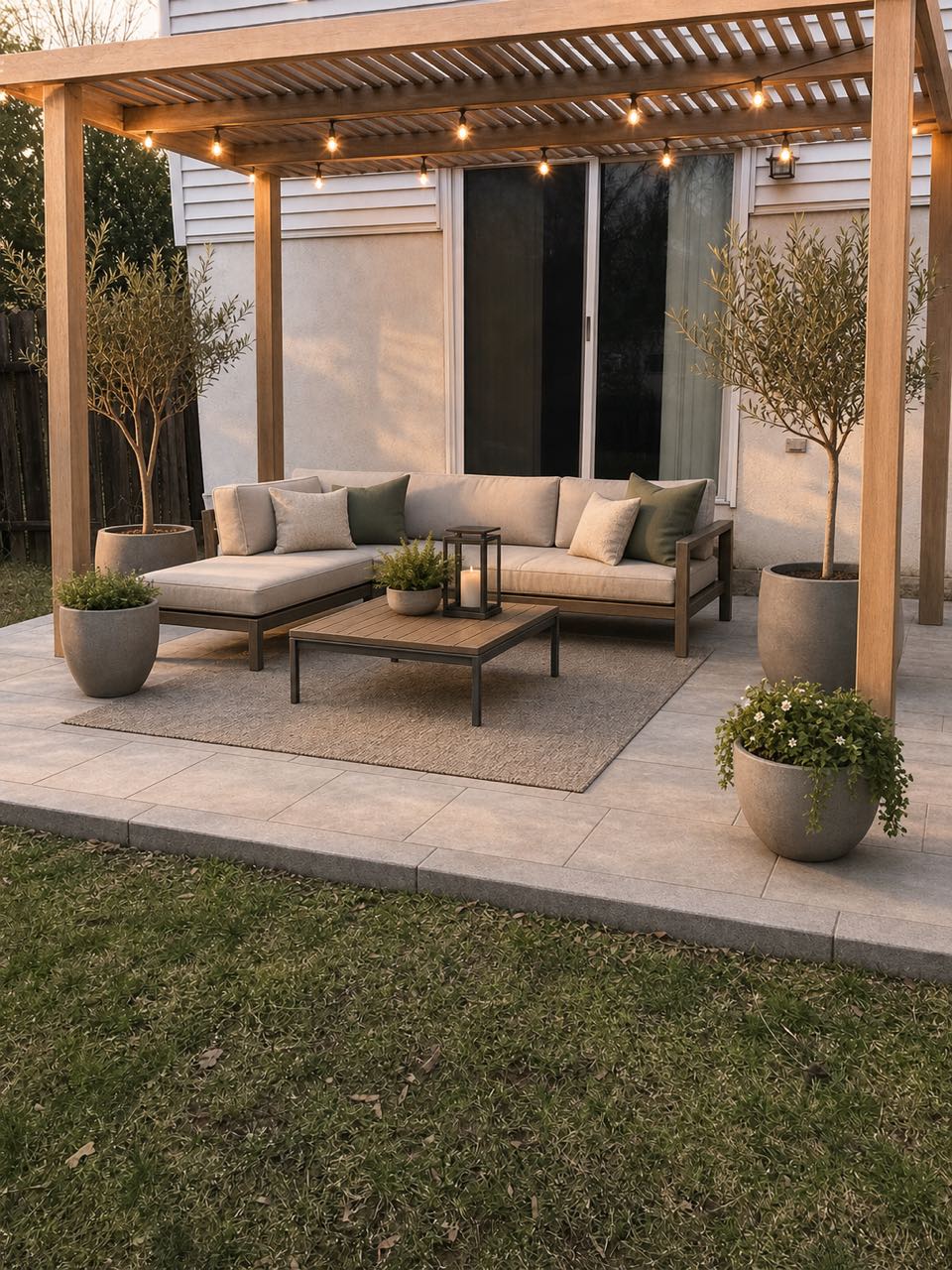 After
After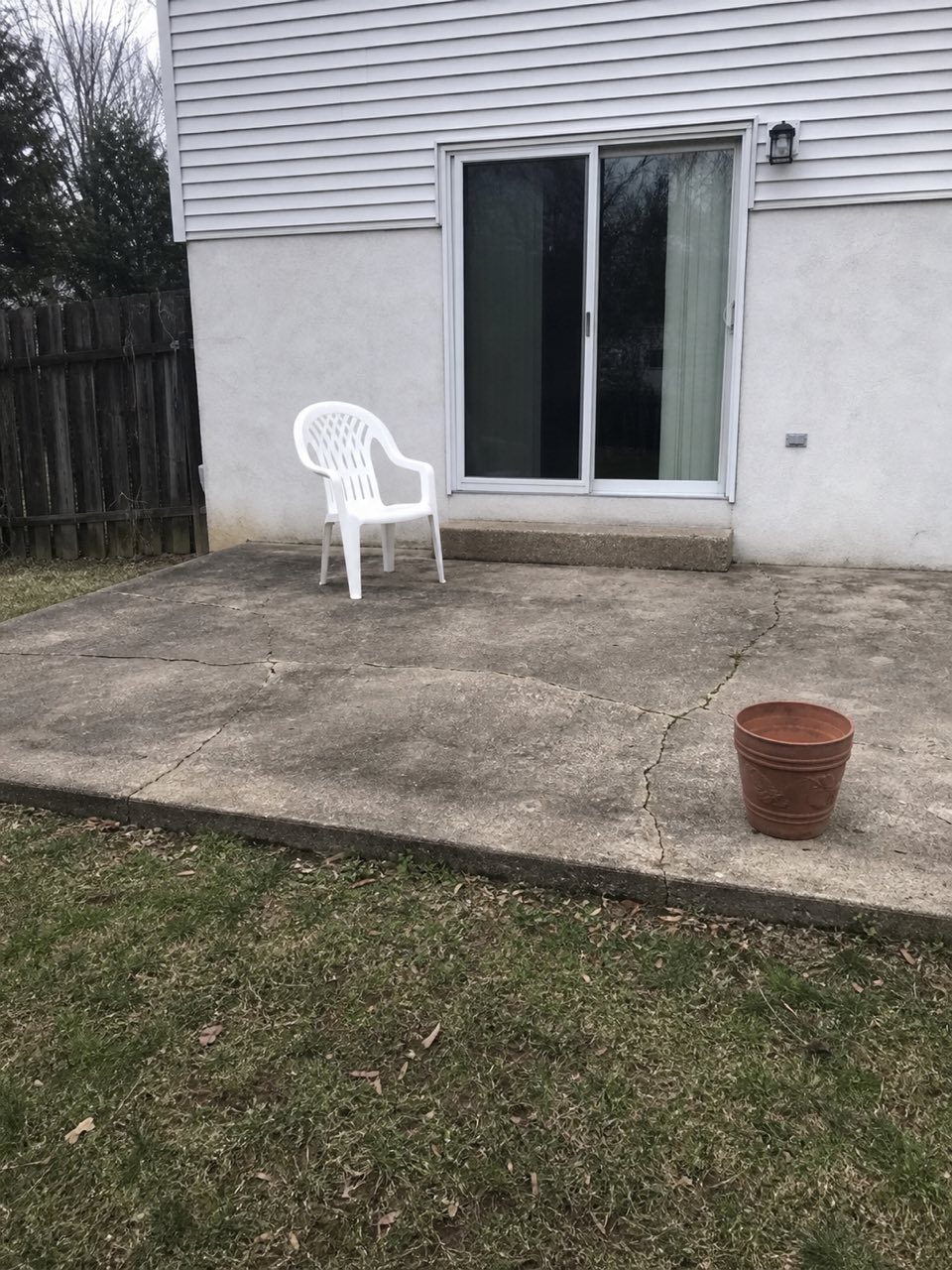 Before
Real result — the same patio, redesigned in a modern outdoor-living style
Patio styles to try
How to redesign your patio with AI
- 1
Upload a photo of your patio
Take or upload a clear photo of your patio — a straight-on shot in daylight that shows the paving, a bit of the house wall and any furniture works best, whether it's a small balcony-style patio or a large covered one.
- 2
Pick your style
Choose from modern, Mediterranean, coastal, tropical and more, and picture the outdoor living space with new pavers, a pergola, an updated furniture layout, planters and lighting.
- 3
Generate in ~30 seconds
Roomvana renders a realistic, redesigned version of your exact patio in about 30 seconds, keeping your house, walls and boundaries in place.
- 4
Compare, download, share
Slide between before and after, download your favorite, upscale it to 4K, or share a link with your partner, contractor or landscaper.
What the AI can change
It restyles
- · Paving & pavers (stone, tile, stamped concrete)
- · A pergola, gazebo or shade sail
- · Outdoor furniture & the seating layout
- · A fire pit, fireplace or chiminea
- · An outdoor kitchen or bar counter
- · Planters, pots & vertical greenery
- · Patio & string lighting
- · Rugs, cushions & soft furnishings
- · Screens, railings & privacy panels
It never touches
- · The house walls & structure
- · Your property boundaries & fence lines
- · The permanent footprint & levels
- · Neighboring buildings & rooflines
- · The camera angle of your photo
Frequently asked questions
What is AI patio design?+
AI patio design uses artificial intelligence to redesign a real photo of your patio. Instead of guessing from a catalog, you see your own outdoor space re-rendered with new pavers, a pergola, furniture and lighting — while the patio stays recognizable. It's the fastest way to preview an outdoor living space before hiring anyone or buying materials.
How does the AI patio design tool work?+
You upload a photo of your patio and pick a style. Roomvana's AI reads the layout, then re-paves and restyles the space while keeping your house walls and boundaries in place. In about 30 seconds you get a realistic before/after you can slide between.
Can it redesign an old concrete slab patio?+
Yes. A tired concrete slab is a great starting point. The AI can show it resurfaced with pavers, natural stone or stamped concrete, then dress it with furniture, planters and lighting. You'll see how a full makeover could look before you decide whether to overlay, replace or simply restyle the existing slab.
Does it work for a small townhouse patio or courtyard?+
It does. Compact patios often benefit most from a clear plan. A modern, japandi or coastal look can make a small courtyard feel intentional with a tidy paver pattern, space-saving furniture, screening and lighting. Just upload a photo of the small space and try a few styles side by side.
Can I try different paving materials?+
Yes. Trying materials is one of the main reasons people use it. Generate the same patio with pavers, natural stone, tile and stamped concrete to compare colors and patterns on your own space. It's a quick, low-cost way to narrow down a look before you price out materials with a contractor.
Can it add a pergola, fire pit or shade structure?+
Yes. The AI can render a pergola, gazebo, shade sail, fire pit or fireplace onto your patio so you can judge the scale and placement. Treat these as concept visuals for inspiration and briefing, not construction drawings — confirm real dimensions, footings and any permits with a professional before building.
Does it work for a covered patio or porch?+
Yes. Upload a photo of a covered patio or porch and the AI keeps the roof and posts in place while restyling the floor, furniture, lighting and greenery underneath. It's a good way to plan an all-weather outdoor living space without changing the existing cover.
How do I take the best patio photo?+
Shoot straight on in daylight, showing the paving, a bit of the house wall and any existing furniture, and avoid heavy shadows or a frame that's mostly sky. If the first render isn't quite right, retake the photo from a slightly higher angle or step back to include more of the patio, then try again.
How is this different from the backyard design page?+
The patio tool focuses on the paved outdoor living area — pavers, a pergola, furniture layout and lighting close to the house. The backyard page covers the wider yard, including lawn, planting beds and landscaping. If your project is mainly the hard surface and seating zone, start here; for the whole garden, use the backyard tool.
Can I use it for an apartment balcony?+
Yes. Upload a photo of your balcony and the AI can show container planting, compact furniture, an outdoor rug, screening and string lighting that make a tight space usable. The house structure and railing stay put, so the result still reads as your balcony, just styled as a proper outdoor room.
How long does it take and how many photos do I need?+
One clear photo is enough, and each design takes about 30 seconds. You can regenerate the same patio in several styles to compare, so most people upload a single good shot and then explore a handful of looks from it.
Is the Roomvana patio design tool free?+
Yes. Every new account gets 3 free designs (watermarked) to try on your patio — no credit card needed. After that, credit packs are one-time buys that never expire; any purchase removes the watermark and unlocks 4K downloads, custom instructions and commercial use. There's no subscription.
Are my photos private, and can I use the results commercially?+
Your uploaded photos are kept private to your account and are used to generate your designs, not shared publicly. Free watermarked designs are for personal exploration, and any credit purchase unlocks commercial use — so contractors, landscapers and stagers can use the renders in client proposals and listings.
Can I try it before signing up?+
Yes. You can explore the tool online on our example patio photos without an account. To redesign your own photo you'll create a free account, which takes a few seconds and comes with 3 free welcome designs to try on your own patio.