iOS App
AI interior design app for iPhone
Roomvana is an AI interior design app for homeowners and renters. Photograph any room with your iPhone, pick a style, and see that exact space redesigned in about 30 seconds — same walls, same windows, new look.
- Photograph the room and redesign it on the spot — no need to move anything to a computer
- Save finished designs straight to your photo library, or share them with a link
- 18 room types, plus house exteriors and gardens, in 23 styles
- Before/after slider, 4K upscaling and buy-once credits — no subscription
3 designs to try when you sign up · iPhone, iOS 17 or later

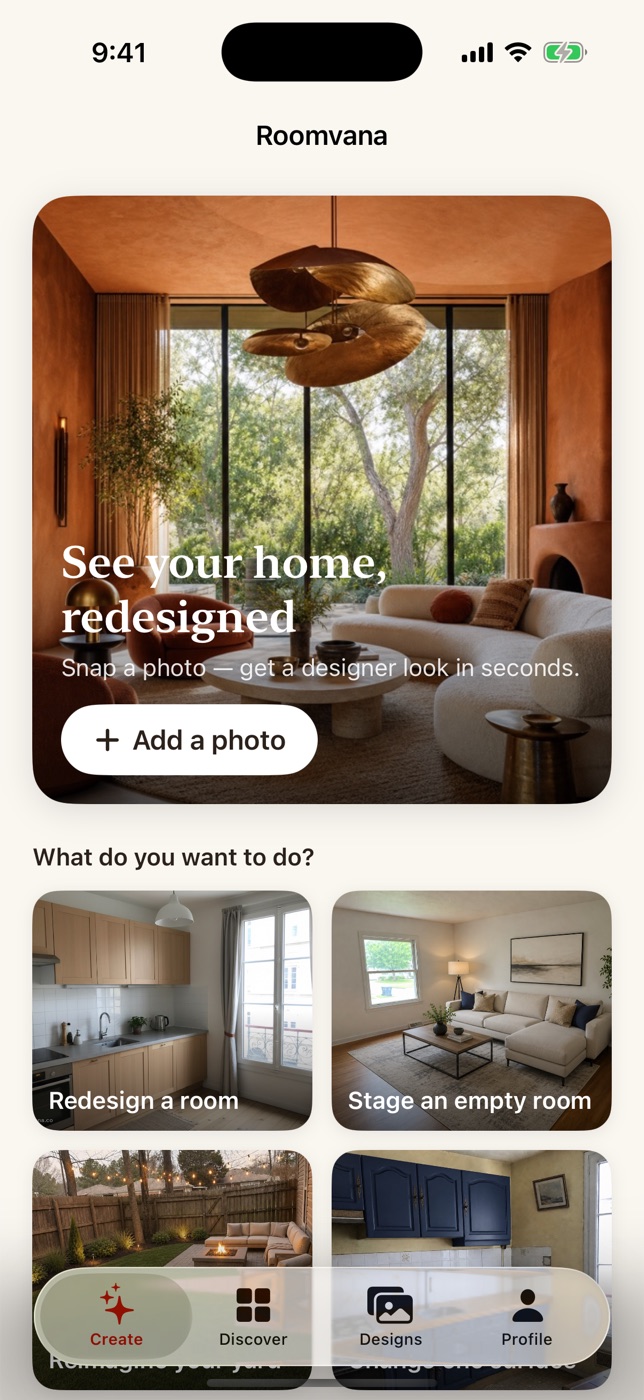
How it works on your iPhone
Take a photo
Shoot the room you're standing in, or pick a photo you already have in your library.
Choose the space and a style
Tell Roomvana what the photo shows — a kitchen, a bedroom, a house exterior, a garden — then pick a style.
Compare it, then save it
Drag the before/after slider to see what changed, then save the design to Photos, share it, or try the same room in another style.
What you can do in the app
- Redesign a room from one photo — no measuring, no floor plan, no mood board
- Restyle interiors, house exteriors, yards and gardens from the same app
- Change one surface at a time — walls, cabinets, floors — and leave the rest of the room alone
- Empty a cluttered room, or stage an empty one before a showing
- Upscale the design you want to keep to 4K
- Every design stays in your Designs tab, so you can come back to it later
Web or iPhone — what's different
Same engine, same styles, same account. What changes is how you add the photo and where the finished design ends up.
| Roomvana | On the web | On iPhone |
|---|---|---|
| Adding a photo | Upload from your computer or your phone's browser | Shoot it with the camera, or pick one from your library |
| Where the result goes | Download the image | Save it straight to Photos, or share it with a link |
| Signing in | Google or an email address | Sign in with Apple |
| Buying credits | Card payment in the browser | Apple in-app purchase |
| Styles and spaces | 23 styles, 18 room types, exteriors and gardens | The same catalog — both run on the same engine |
| Your credits | One balance on your account | The same balance, when both sign-ins use the same email address |
Roomvana for iPhone — FAQ
Is there a Roomvana app for iPhone?+
Yes. Roomvana: AI Interior Design is on the App Store for iPhone, running iOS 17 or later. It does what Roomvana does on the web, with your camera and photo library built in.
What does the Roomvana iPhone app do?+
It redesigns a real room from a single photo. You photograph the space, pick a style, and the AI re-renders it while keeping the actual walls, windows and layout — so the result looks like your room, not a catalog image.
Do I need an account to use the app?+
Yes, and you create it with Sign in with Apple — one tap, no password to create. New accounts start with 3 designs to try on your own room.
Do my credits work on both the web and the iPhone app?+
Yes, as long as both sign-ins use the same email address: then it's one account and one balance, whether the credits were bought on roomvana.co or inside the app. If you use Apple's Hide My Email, the app creates a separate account under that private address instead.
Which iPhones can run it?+
Any iPhone running iOS 17 or later. The app is built for iPhone in portrait; there is no iPad-specific version yet, so on an iPad it runs at iPhone size.
Is there an Android version?+
Not yet. Roomvana works in mobile browsers, so on Android you can use roomvana.co the same way — take a photo, upload it, pick a style, and download the result.
What happens to the photos I upload?+
They are sent to Roomvana's servers to generate your design, and they are never used to train AI models. You can delete a design, or your whole account, at any time.
Prefer the browser? Everything works on the web too — open Roomvana's design studio.
Not sure which space to start with? Browse every space Roomvana redesigns.