AI cabinet design — see new cabinet colors on your own kitchen
Repainting or refacing your cabinets is one of the biggest looks in the whole kitchen — and one of the easiest to get wrong. A color that looks great on a swatch can read totally different across a full run of doors, and by then the paint or the new fronts are already paid for. Roomvana's AI cabinet visualizer lets you see it first: upload one photo of your kitchen, pick a cabinet color or finish, and in about 30 seconds you get a photo-real preview with only the cabinet doors changed — countertops, backsplash, appliances and floor stay exactly as they are. It's free to try, and you can test it on an example photo before you sign up.
No photo? Try an example: · ·
Space
Room
Mode
Pick one surface — the AI changes only that and leaves everything else untouched.
Surface
Color & finish
Free to try — 3 designs on your own room, no card needed.
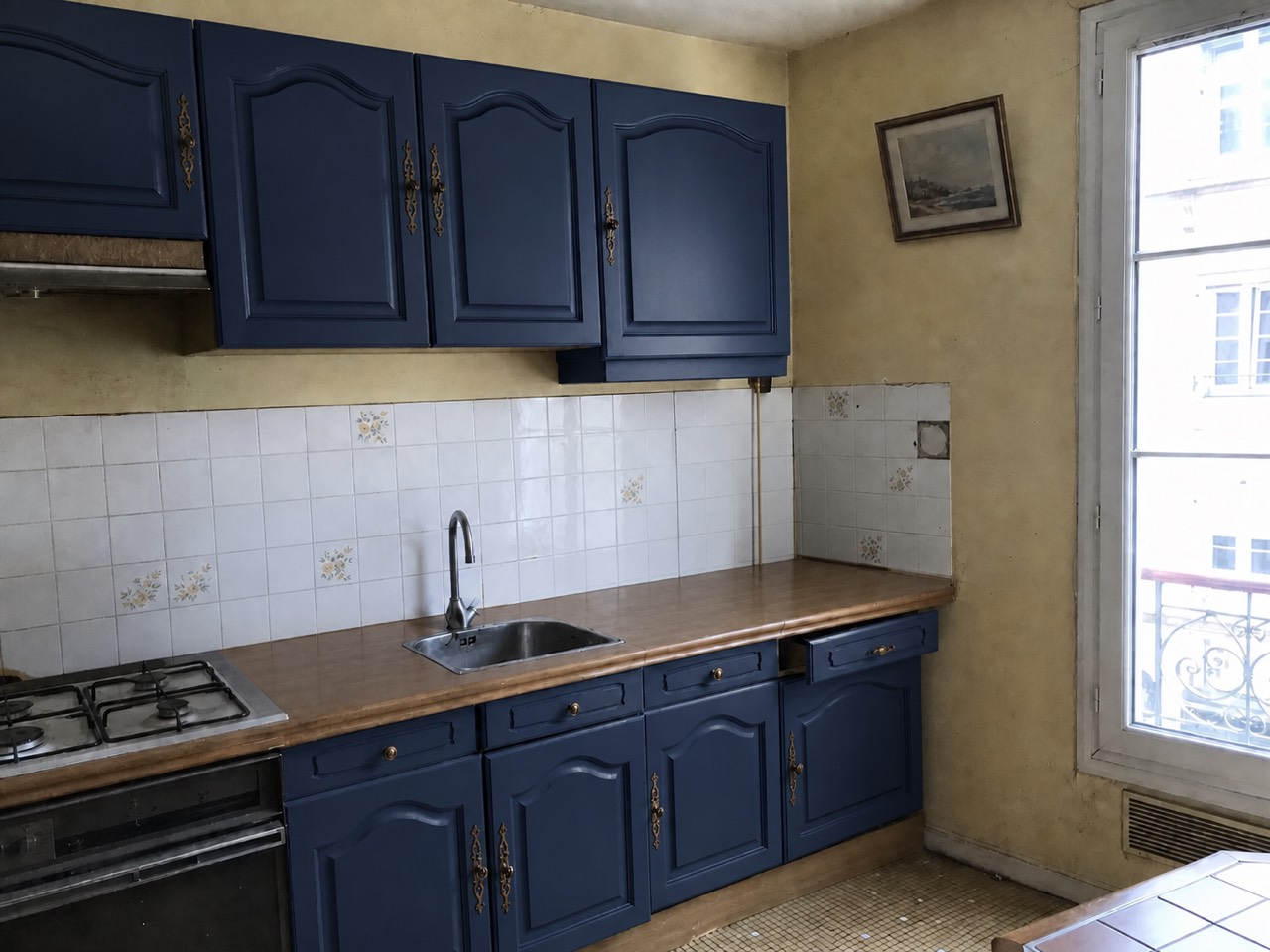 After
After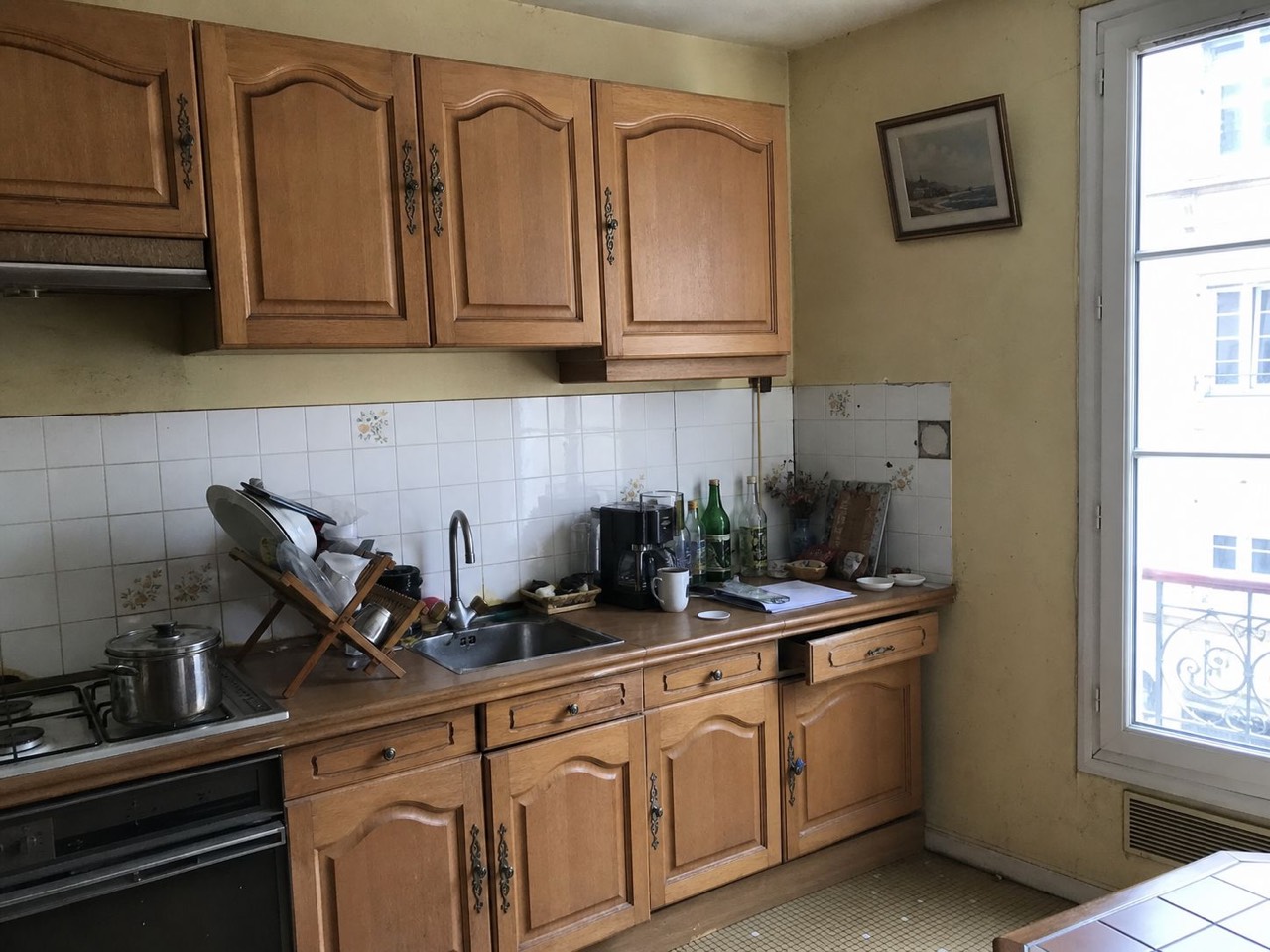 Before
Same kitchen, cabinet doors recolored to navy blue · Roomvana
Cabinet colors & finishes to try
How to redesign your cabinets with AI
- 1
Upload a photo of your kitchen
Take or upload a clear, straight-on photo of your kitchen that shows the run of cabinets you want to recolor. Good light and a full view of the doors give the most realistic result.
- 2
Switch to One surface mode and pick Cabinets
In the tool, choose the One surface mode and select Cabinets. This tells the AI to change only your cabinet doors and drawer fronts — nothing else in the room.
- 3
Choose a color or finish
Pick from 10 cabinet finishes — white shaker, cream, greige, sage green, forest green, navy blue, black matte, natural oak, walnut, or a two-tone look with lighter uppers and a darker base.
- 4
See it in ~30 seconds
Roomvana renders your kitchen with the new cabinet color in about 30 seconds. Slide between before and after, try another color, then download or share your favorite.
What the AI can change
It restyles
- · Cabinet door & drawer-front color
- · Cabinet finish (painted, matte, wood grain)
- · A two-tone upper / lower combination
It never touches
- · Countertops & backsplash
- · Appliances, sink & faucet
- · Flooring
- · The kitchen layout & cabinet boxes
- · Windows & the view outside
Frequently asked questions
Does this show a repaint or new cabinet doors?+
It shows the end look rather than a specific method. The AI renders your cabinet doors in a new color and finish, photo-real, so the preview works whether you're planning to repaint your existing cabinets or reface them with new fronts. The color and finish on screen are what you're deciding on; how you get there — paint or refacing — is up to you and your budget.
Will my countertops and backsplash change too?+
No. This page changes only the cabinet doors and drawer fronts. Your countertops, backsplash, appliances, sink and floor stay exactly as they are in your photo, so you can judge a cabinet color against the surfaces you already own. If you want to reimagine the whole kitchen — counters, backsplash, layout and all — use the AI kitchen design page instead.
Can it do a two-tone kitchen with lighter uppers and a darker base?+
Yes. Pick the two-tone preset and the AI keeps your upper cabinets lighter while giving the lower cabinets a deeper color, which is a popular way to add contrast without going dark everywhere. Seeing it on your own layout makes it much easier to judge than imagining it from a showroom sample.
Can I use this on a bathroom vanity or a closet?+
This page is set up for kitchen cabinets, but the same cabinet finishes work on other rooms — just start from the bathroom or closet page and choose the Cabinets surface there. The color options are the same painted and wood-grain finishes.
Refacing or repainting — which should I choose?+
As a rough guide: if your cabinet boxes and doors are solid and you just want a new color, repainting is the cheaper route. If the doors are dated, damaged, or you want a different door style, refacing with new fronts makes more sense. Either way, previewing the finished color here first helps you commit before you spend on paint or new doors.
Is the AI cabinet visualizer free?+
Yes. Every new account gets 3 free cabinet designs to try on your own kitchen — no credit card needed. After that, credit packs start at $5.99 for 10 credits and the credits never expire. You can also test the tool on an example kitchen photo before you sign up.
Is there a watermark on the free designs?+
The 3 free designs come with a small watermark. Any purchase — starting at $5.99 for 10 credits — removes the watermark and unlocks 4K downloads and commercial use, so you can print a color option or send it to your contractor cleanly.
What photo of my kitchen works best?+
A well-lit, straight-on photo that shows the full run of cabinet doors gives the best result. Shoot from far enough back to capture the whole cabinet wall, avoid steep angles, and clear the counters a little so the doors read clearly. A normal phone photo from a step or two back is usually perfect.
Do the wood-grain finishes like oak and walnut look realistic?+
Yes. The natural oak and walnut finishes render as real wood grain on your doors rather than a flat brown fill, so you can judge how a warm wood tone would sit against your counters and floor. As with any preview, treat it as a close, realistic guide rather than an exact paint-chip or veneer match.
How fast is it, and can I try several colors?+
Each render takes about 30 seconds from one photo. Because it's that quick, most people run the same kitchen through several colors — say navy, sage and two-tone — and line the results up side by side before deciding.
I'm selling my house — is a cabinet refresh worth previewing?+
Often, yes. New cabinet color is one of the cheapest ways to modernize a kitchen for listing photos, and previewing it lets you pick a broadly appealing, neutral-leaning color instead of gambling on paint. Seeing white shaker, greige or a soft sage on your actual cabinets helps you choose something buyers respond to.
Which cabinet colors and finishes can I try?+
There are 10 finishes: white shaker, cream, greige, sage green, forest green, navy blue, black matte, natural oak, walnut, and a two-tone combination. You can try any of them on the same photo and compare before you commit.
What happens to my photos?+
Your photos stay private and are never used to train AI models. They're stored only so you can revisit your designs, and you can delete them any time from your gallery or by deleting your account.