AI Attic Design — see your attic redesigned in seconds
Roomvana's AI attic design tool turns a single photo of your attic into a realistic redesign in 23 styles. Upload your photo, choose a look, and see furniture that fits under the slope, a cozy dormer nook and layered lighting on your own attic in about 30 seconds — while the sloped roofline, skylights and footprint stay exactly where they are. It's free to try, and you can explore it without signing up.
No photo? Try an example: · ·
Space
Room
Mode
Upload a furnished room — the AI restyles it, keeping your layout.
Style
Free to try — 3 designs on your own room, no card needed.
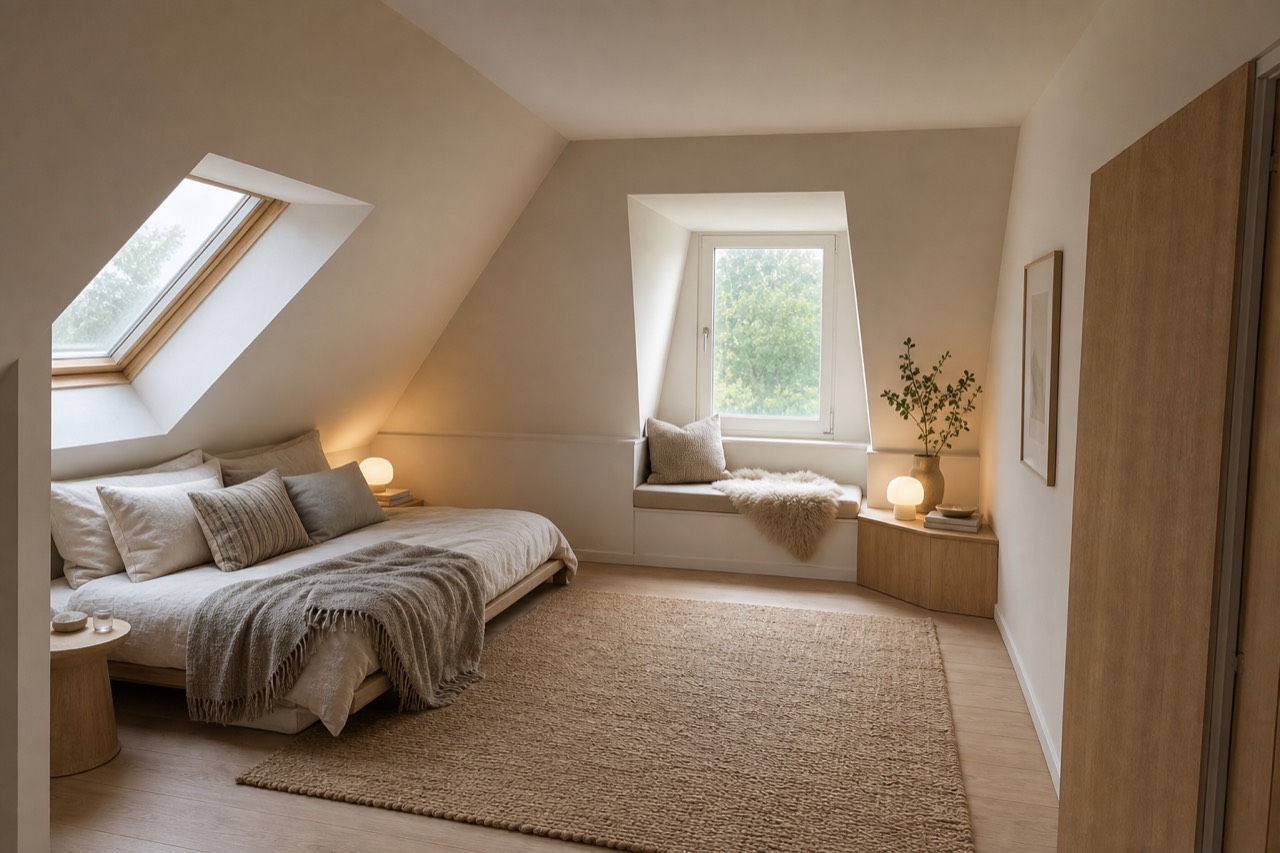 After
After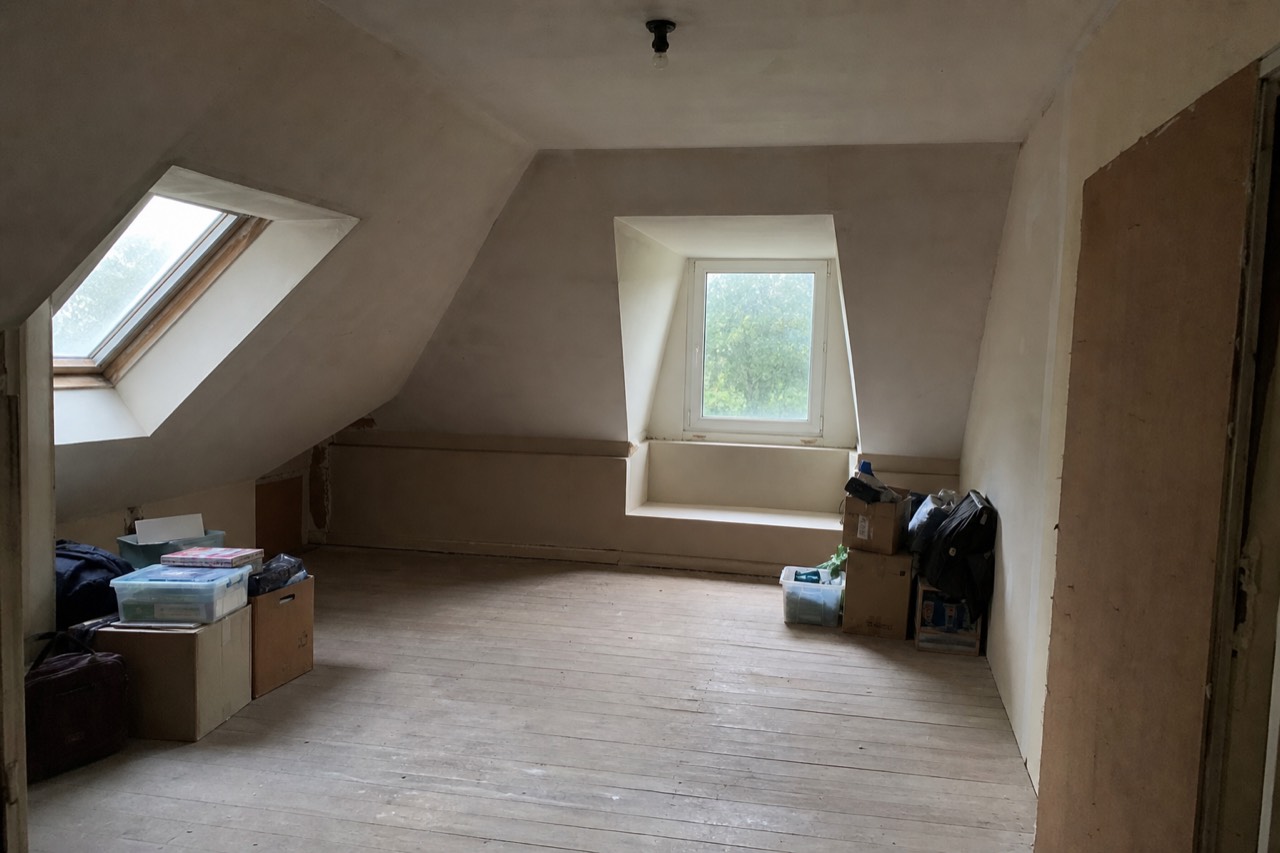 Before
Redesigned by Roomvana · Scandinavian
Attic styles to try
How to redesign your attic with AI
- 1
Upload a photo of your attic
Take or upload a clear photo of your attic — a shot that captures the sloped ceiling, a dormer or knee wall and as much floor as possible works best.
- 2
Pick your style
Choose from 23 styles, from Scandinavian and Japandi to boho, cottagecore, rustic and 2026 trends.
- 3
Generate in ~30 seconds
Roomvana renders a realistic redesign of your exact attic in about 30 seconds, fitting furniture to the slope.
- 4
Compare, download, share
Slide between before and after, download your favorite, upscale it to 4K, or share a link with your partner or builder.
What the AI can change
It restyles
- · Sloped-ceiling-friendly furniture
- · A cozy dormer nook
- · Skylight & layered lighting
- · Flooring & built-ins
- · Wall color & decor
- · Rugs, textiles & storage
It never touches
- · The sloped roofline & structure
- · The windows & skylight positions
- · The room's footprint
Frequently asked questions
What is AI attic design?+
AI attic design uses artificial intelligence to restyle a real photo of your attic. Instead of guessing from a catalog, you see your own loft re-rendered in a new style — with furniture that fits under the slope, a dormer nook, better lighting and fresh finishes — while the sloped roofline and skylights stay recognizable. It's the fastest way to preview an attic makeover before spending on furniture.
How does the AI attic designer work?+
You upload a photo of your attic and pick a style. Roomvana's AI reads the room's shape — including the pitch of the ceiling and any dormers — then restyles and refurnishes it while keeping your roofline, skylights and footprint in place. In about 30 seconds you get a realistic before/after you can slide between.
Can it handle a low, sloped ceiling?+
Yes — that's the whole point of designing an attic. The AI works with the pitch instead of ignoring it: it places low-profile beds, seating and dressers under the slope, tucks storage into the knee walls, and keeps tall pieces where headroom allows. You get to see how furniture actually sits under your ceiling before you buy it.
Can I see my attic converted into a bedroom?+
Yes. Choose a bedroom-leaning style like Scandinavian, Japandi or cottagecore and the AI stages your attic as a cozy loft bedroom — a low bed under the slope, soft layered lighting, rugs and nightstands — so you can judge whether the space works as a retreat before committing to the conversion.
Can it design an attic office or studio?+
It can. The AI can stage your attic as a home office or studio — a desk under a dormer window for light, shelving along the knee walls and a reading corner — so you can see how a workspace would live in the roof space while the structure stays untouched.
Does it make use of the dormer and skylights?+
Yes. Dormers and skylights are an attic's best feature, so the AI leans into them — staging a window nook or desk in the dormer and using the skylight daylight to plan layered lighting for the darker corners under the slope. It won't move the windows; it designs around where they already are.
Is Roomvana's AI attic design tool free?+
Yes. Every new account gets 3 free designs (watermarked) to try it on your attic — no credit card needed. After that, credit packs start at $5.99 for 10 designs and never expire; any purchase removes the watermark and unlocks 4K downloads, custom instructions and commercial use. There's no subscription.
Can I try it from a photo without signing up?+
You can explore the tool on our example photos without an account. To redesign your own attic photo you'll create a free account, which takes a few seconds and comes with 3 free welcome designs to try on your own photo.
What photo works best?+
A well-lit photo that shows the sloped ceiling, a dormer or knee wall and some floor gives the best results. Avoid heavy clutter, extreme angles and very dark shots — attics can be dim, so open the skylight blinds or add a light. A normal phone photo from the top of the stairs is usually perfect.
Which attic styles can I try?+
There are 23 styles, including Scandinavian, modern, boho, rustic, cottagecore, minimalist, coastal, industrial, Japandi and a curated 2026-trends look. Attics suit warm, cozy directions especially well, but any of them will work — compare the results side by side.
Will the AI change my attic's roofline, skylights or footprint?+
No. Roomvana is built to keep the sloped roofline, the skylight and window positions and the room's footprint exactly where they are. It changes the furnishings and finishes — furniture, flooring, built-ins, lighting and wall color — so the result still looks like your attic, just restyled.
Does it work for a small attic?+
Yes. Because the AI preserves your existing footprint and slope, it works well for small, awkward attics — it restyles the space you actually have instead of imagining a bigger room. It's a handy way to see whether a lighter palette, built-in storage in the knee walls or a slimmer bed frame would make the loft feel larger and calmer.
Can I download a higher-resolution version?+
Every design comes at a standard resolution that's great for comparing styles and sharing the idea. When you want a crisp, print-ready copy, upscale any design to 4K for just 1 credit.
What happens to my photos?+
Your photos stay private and are never used to train AI models. They're stored only so you can revisit your designs, and you can delete them any time from your gallery or by deleting your account.